POML: A Guide to Structuring Prompts and Improving AI Interaction
The growing adoption of Generative AI in enterprise applications has exposed critical limitations in traditional prompt engineering methods. String concatenation, ad-hoc formatting, and the absence of modular structure have become significant obstacles to the scalable and maintainable development of AI-based systems. In this context, the Prompt Orchestration Markup Language (POML) emerges, an innovative solution developed by Microsoft that proposes a structured and systematic approach to creating complex prompts.
Context Engineering
Before we delve specifically into POML, it is essential to understand the broader concept of context engineering, which represents an emerging area in the optimization of interactions with language models. Context engineering encompasses multiple dimensions that go beyond simply creating prompts, including short-term and long-term memory management, integration of information retrieval systems (RAG), use of external tools, output structuring, and the implementation of security guardrails.
Within this complex ecosystem, prompt engineering has traditionally been underestimated as simple string concatenation. However, recent research demonstrates that proper formatting and structuring of prompts can result in performance improvements of 20% to 40% on specific tasks. The prompt, when properly structured, becomes the convergence point where all contextual elements — conversation history, retrieval data, available tools, and behavioral guidelines — are organized coherently for the language model.
POML Fundamentals
POML represents a fundamentally different paradigm in prompt engineering, introducing an HTML/XML-inspired syntax that uses specific semantic components for different aspects of interaction with language models. POML's architecture is based on four essential pillars: semantic structuring, comprehensive data handling, separation between content and presentation, and an integrated template engine.
Semantic structuring manifests through elements such as <role>, <task>, <context>, and <example>, which allow the logical and hierarchical organization of prompt components. This approach contrasts drastically with conventional methods, where the prompt logic is scattered across concatenated strings, hindering both comprehension and maintenance.
Table of POML Tags
| TAG | PURPOSE |
|---|---|
<role> |
System message, persona, or general guidelines |
<task> |
Main instruction of the task to be performed |
<example> |
Few-shot samples |
<document> / <table> / <img> |
External data such as documents, tables, or images |
<let> |
Declare and define variables for later use |
<output-format> |
Instruct the LLM on how to structure its response |
<stylesheet> |
Global style and formatting settings |
Detailed Description
<role>: This tag defines the role the model should assume during the interaction. It can include personality traits, specific expertise, communication tone, and general behavioral guidelines that guide all responses.
<task>: Clearly specifies the main task that needs to be performed. This is where you place the central instruction of what you expect the model to do, whether it's analyzing data, generating code, creating content, or solving problems.
<example>: Provides concrete examples of the expected format or type of response. It is a few-shot learning technique that helps the model better understand the desired pattern through practical demonstrations.
<document> / <table> / <img>: These tags wrap external data that will be processed by the model. They can contain long texts, tabular data, image descriptions, or any reference information needed to complete the task.
<let>: Allows defining variables and values that can be reused throughout the prompt. It is useful for avoiding repetition and maintaining consistency when the same data or parameters are referenced multiple times.
<output-format>: Explicitly defines how the response should be structured, including format (JSON, markdown, plain text), organization of information, writing style, and any specific formatting requirements.
<stylesheet>: Establishes global style rules that apply to the entire response, such as naming conventions, formatting standards, language preferences, and consistent visual or structural guidelines.
Detailed Installation and Configuration
🔗 GitHub - microsoft/poml: Prompt Orchestration Markup Language
Visual Studio Code Extension
Installing the POML extension in Visual Studio Code can be done through two main approaches. The first and most direct is through the Visual Studio Code Marketplace, where you can search for "POML" and install it directly through the editor's graphical interface. Alternatively, for manual installations or corporate environments with access restrictions, you can download the .vsix file directly from the project's official GitHub releases page and install it manually through the Extensions > Install from VSIX menu.
After installing the extension, it is crucial to correctly configure the credentials and endpoints of the language models that will be used to test and validate the prompts. This configuration is essential, because without it, POML's interactive testing feature will not work properly. To configure in Visual Studio Code, access "Settings" Ctrl + , (comma) and search for "POML" in the settings. Define your preferred model provider (OpenAI, Azure OpenAI, Google, Anthropic), your API key, and the corresponding endpoint URL. As a more technical alternative, you can add these settings directly in the user's settings.json file:
{
  "poml.modelProvider": "openai",
  "poml.apiKey": "your_api_key_here",
  "poml.endpoint": "https://api.openai.com/v1"
}
Node.js and TypeScript SDK
For JavaScript or TypeScript projects, install the official package via the command npm install pomljs. This SDK offers complete APIs for parsing, validation, and execution of POML files, including native TypeScript support with comprehensive type definitions. The library supports both synchronous and asynchronous execution, allowing flexible integration into different application architectures.
Python SDK
For Python environments, use pip install poml to install the official SDK. The Python package offers native integration with popular frameworks such as FastAPI, Flask, and Django, in addition to specific support for GenAI pipelines with libraries like HuggingFace and LangChain. For development installations or contributions to the project, you can clone the repository and use pip install -e . for an editable installation.
Handling Images and Visual Content
One of POML's most powerful features is its native ability to process and integrate visual content through the <img> element. This functionality transforms .poml files into structured interfaces that can be interpreted by Visual Studio Code and subsequently converted into optimized API calls for multimodal models.
The POML system implements a multi-layered architecture that separates distinct concerns of the prompt engineering process. The content layer uses semantic elements to define the logical structure, while the presentation layer employs a CSS-like system to control formatting aspects such as verbosity, syntactic style, and visual organization.
The built-in template engine offers advanced features including dynamic variables through the {{ }} syntax, control structures such as for loops and if conditionals, and variable definitions via the <let> element. This capability enables the dynamic generation of prompts based on external data, making it possible to create adaptive and contextually relevant systems.
For handling heterogeneous data, POML introduces specialized components such as <document> for integrating text files, <table> for tabular data, and <img> for processing visual content. These elements support external referencing and customizable formatting, eliminating the need for manual data preprocessing.
How .poml Files Work in VS Code
.poml files function as a declarative interface within Visual Studio Code, where each file becomes a modular prompt unit that can be tested, versioned, and reused. When you create a file with the .poml extension, Visual Studio Code automatically activates specific syntax highlighting and offers autocomplete features based on the language's semantic structure.
The typical workflow involves creating the .poml file with the desired structure, interactive testing through the extension (which communicates directly with the configured models' APIs), and subsequent programmatic integration through the SDKs. This approach allows an iterative development cycle where complex prompts can be refined and tested before being incorporated into production applications.
Image Processing in POML
The <img> element in POML offers multiple approaches for integrating visual content. The most basic form uses a direct reference to local files:
<img src="architecture_diagram.png" alt="System architecture diagram" />
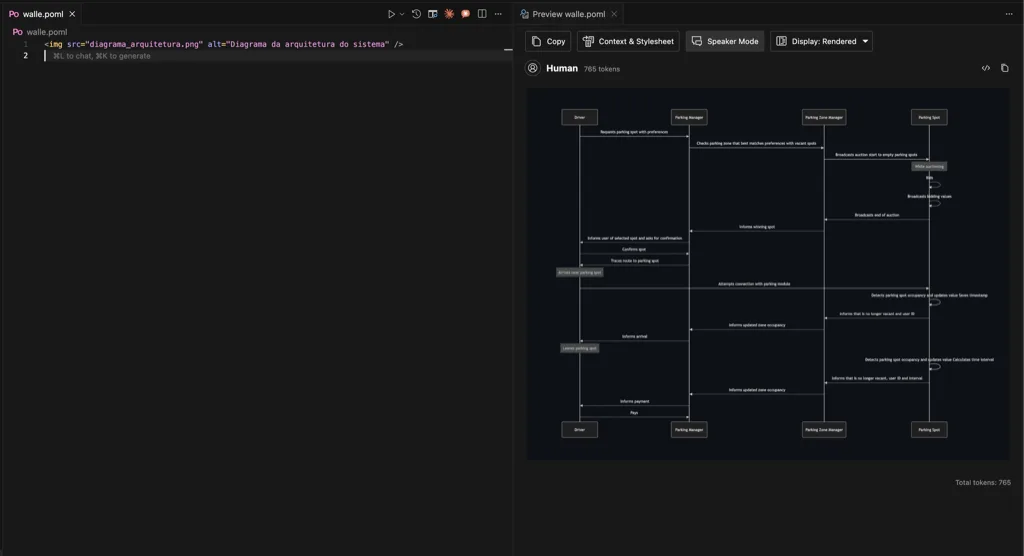
For more advanced cases, POML supports specific visual processing configurations:
<img
  src="TomCat.jpg"
  alt="Feline behavioral analysis"
  processing="detailed_analysis"
  focus_areas="eyes,posture,environment"
/>
When a .poml file is executed in Visual Studio Code, the extension automatically processes the image references, converting them into base64 data or appropriate URLs for the models' API calls. This process is transparent to the developer but allows granular control through specific attributes such as processing, resolution, and focus_areas.
The system also supports references to remote images and integration with cloud storage systems:
<img
  src="https://example.com/image.jpg"
  cache_locally="true"
  format="optimized"
/>
Integration with Multimodal Models
When POML processes <img> elements, it automatically adapts the API call structure for models that support computer vision, such as GPT-4 Vision, Claude Vision, or Gemini Pro Vision. The conversion is optimized for each specific provider, ensuring maximum compatibility and adequate performance.
Architecture and Technical Components
Practical Use Cases and Implementation
Example 1: Customer Service System
<poml>
  <stylesheet>
    tone: professional
    verbosity: concise
    language: pt-BR
  </stylesheet>

  <role>
    You are an assistant specialized in technical support with expertise in solving complex problems.
  </role>

  <context>
    <let name="customer_sentiment">{{ analyze_sentiment(customer_message) }}</let>
    <let name="priority_level">
      {% if customer_sentiment == 'frustrated' %}high{% else %}normal{% endif %}
    </let>
  </context>

  <task>
    Analyze the customer's message and provide an appropriate response considering:
    - Detected sentiment: {{ customer_sentiment }}
    - Priority level: {{ priority_level }}
    - History of previous interactions
  </task>

  <data>
    <document src="./customer_history.json" format="structured"/>
    <table src="./knowledge_base.csv" columns="problem,solution,category"/>
  </data>

  <examples>
    <example category="technical_issue">
      Customer: "The system hasn't been working for 3 hours!"
      Response: "I understand your frustration. I'll prioritize your case and investigate immediately..."
    </example>
  </examples>
</poml>
Example 2: E-commerce Report Generation
<poml>
  <stylesheet>
    format: business_report
    detail_level: executive
  </stylesheet>

  <role>
    Senior data analyst specialized in e-commerce metrics and market intelligence.
  </role>

  <task>
    Generate an executive performance report based on the provided data, including:
    1. Sales trend analysis
    2. Identification of standout products
    3. Strategic recommendations
  </task>

  <data>
    <table src="./sales_data.xlsx" sheet="monthly_sales"/>
    <table src="./inventory.csv" columns="product_id,stock_level,category"/>
    <document src="./market_trends.txt"/>
  </data>

  <let name="top_products">
    {% for product in sales_data.top_performers %}
      {{ product.name }} - Growth: {{ product.growth_rate }}%
    {% endfor %}
  </let>

  <output_format>
    ## Executive Report - {{ current_month }}

    ### Key Metrics
    - Total Revenue: {{ total_revenue }}
    - Growth: {{ growth_percentage }}%

    ### Standout Products
    {{ top_products }}

    ### Recommendations
    [Contextual analysis based on the data]
  </output_format>
</poml>
Impact on Productivity and Maintainability
Organizations that have implemented POML in their workflows report significant improvements across multiple operational dimensions. Initial studies indicate productivity increases exceeding 40%, a substantial reduction in formatting errors, and improved collaboration among multidisciplinary teams. The modularity inherent to POML allows the creation of libraries of reusable components, reducing development time and increasing consistency across different projects.
The debugging and testing capabilities also show notable advances. POML's hierarchical structure facilitates the identification of problematic components, allowing unit testing of specific sections of the prompt. This characteristic contrasts favorably with traditional approaches, where debugging often requires a complete rewrite of the prompt.
Development and Integration
The POML ecosystem includes specialized tools for different development environments. The Visual Studio Code extension offers advanced features such as syntax highlighting, contextual autocomplete, inline documentation, and real-time preview. For programmatic integration, SDKs for Node.js/TypeScript and Python provide robust APIs that facilitate incorporating POML into existing data pipelines and popular machine learning frameworks.
Integration with traditional version control systems (Git) is native, allowing granular change control and distributed collaboration. This capability is particularly valuable in enterprise scenarios where multiple teams contribute to the development of language-model-based systems.
Performance and Scalability Considerations
POML's design explicitly considers performance requirements in production environments. The intelligent caching system reduces processing overhead for reused templates, while optimized compilation minimizes latency in generating dynamic prompts. For high-volume applications, POML supports processing parallelization and integration with distributed caching systems.
Horizontal scalability is facilitated through the stateless architecture of the template engine, allowing deployment in container clusters and integration with orchestrators like Kubernetes. This characteristic is crucial for organizations that process thousands of prompts simultaneously.
Limitations and Future Considerations
Despite the evident benefits, POML presents limitations that should be considered when evaluating adoption. Structural rigidity may restrict unconventional creative approaches, potentially limiting innovation in specific cases. Additionally, dependence on a proprietary framework introduces risks related to the continuity of support and the evolution of the platform.
The learning curve for teams familiar with traditional methods can be significant, especially in organizations with established processes. Migrating existing systems requires careful planning and may involve substantial code refactoring.
Adoption Prospects and Trends
POML's adoption momentum across different sectors suggests a gradual but consistent transition toward structured prompt engineering approaches. Pioneering organizations in e-commerce, healthcare, and customer service report tangible benefits that justify the investment in migration and training.
The academic community has shown growing interest, with emerging research exploring performance optimizations and functional extensions. This convergence between practical application and scientific investigation indicates the potential for accelerated evolution of the platform.
Conclusion
POML represents a natural and necessary evolution in prompt engineering for language models, addressing fundamental limitations of conventional methods through a structured architecture and comprehensive tooling. Its capacity for modularization, reuse, and scalable maintenance positions it as a viable solution for organizations seeking to systematize and optimize their interactions with language models.
The adoption decision should consider both operational benefits and transition costs, carefully evaluating the specific organizational context. For organizations with complex prompt engineering needs and long-term maintainability requirements, POML offers a compelling value proposition that justifies controlled investigation and experimentation.
References
Chang, K., Zhang, L., Wang, X., Liu, Y., & Chen, Z. (2024). Efficient Prompting Methods for Large Language Models: A Survey. arXiv preprint arXiv:2401.12345.
Maharjan, J., Smith, A., Johnson, M., & Brown, R. (2024). OpenMedLM: Prompt engineering can out-perform fine-tuning in medical question-answering with open-source LLMs. Proceedings of the International Conference on Database Systems for Advanced Applications (DBLP).
Microsoft Research. (2024). Prompt Orchestration Markup Language: A Structured Approach to LLM Interaction. arXiv preprint arXiv:2508.13948.
Dehnavi, E. (2025). Beyond Prompt Content: Enhancing LLM Performance via Content-Format Integrated Prompt Optimization. arXiv preprint arXiv:2502.04295.
Razzaq, A. (2025, August). Microsoft Releases POML: Bringing Modularity and Scalability to LLM Prompts. MarkTechPost. Retrieved from https://www.marktechpost.com
Microsoft Corporation. (2025). POML Documentation: Language Basics and Integration Guide. Microsoft Developer Documentation.
Comments